Welcome to the Whole Life Challenge! We are excited to have you with us on this wonderful journey. This guide will help you navigate and fully benefit from the next 6 weeks. Click on any section of the table of contents below to skip to that section, or scroll down to browse the how-to-play guide in the same order that you’ll encounter each topic during the Challenge.
- Join or Create a Group
- Choose Your Play Level
- Suggested and Non-compliant Foods Lists
- Setting Your Sleep Commitment
- Self-Assessment
- Privacy Settings - What can others see?
- Daily Play and Scoring
- Finishing the Challenge
----------------------------------------------------------------------------------
Where Is the Menu?
The main menu in the Whole Life Challenge website can be accessed by clicking on the three line in the upper left corner of the screen. 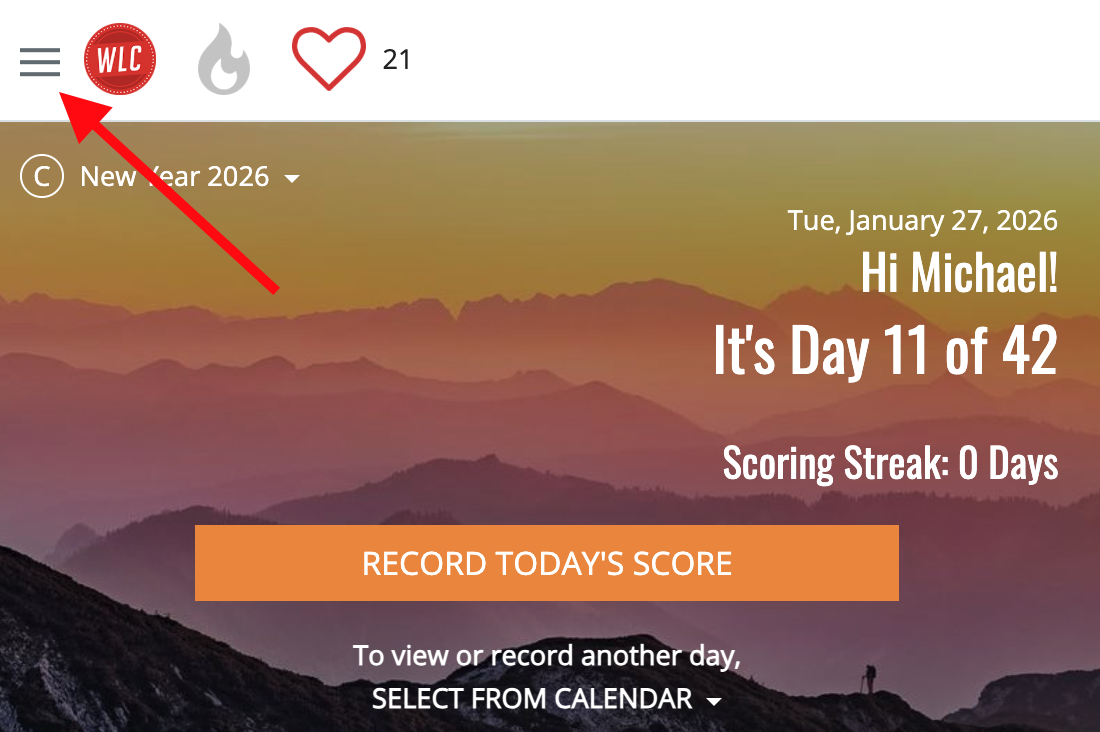
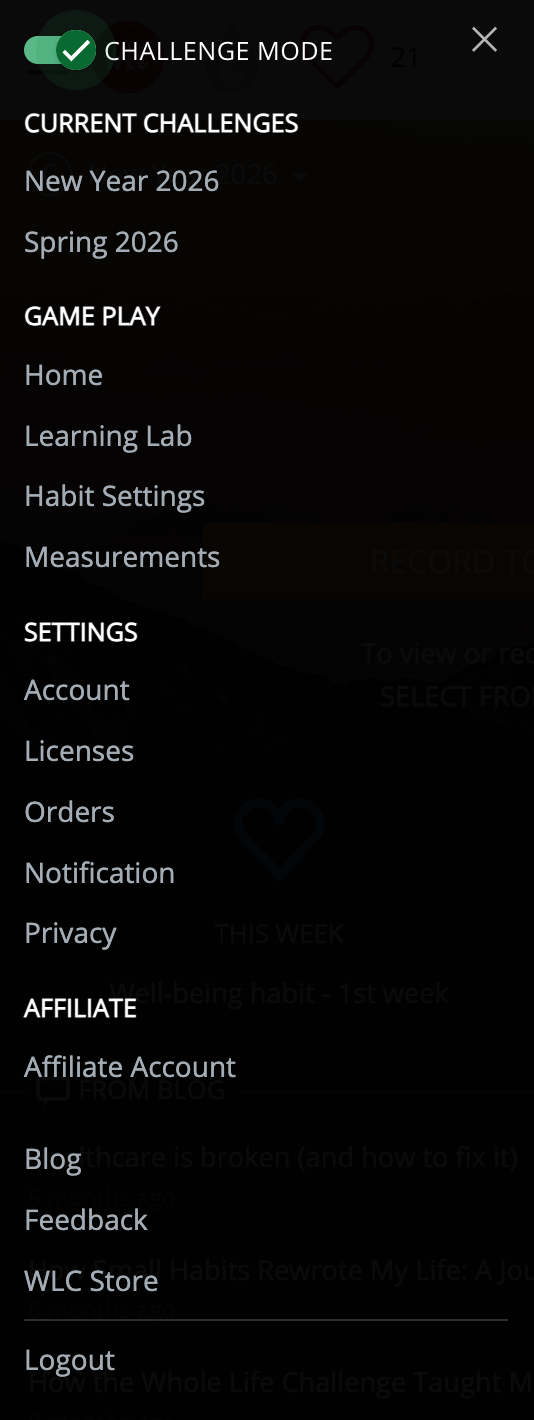
You can access any part of the site from this main navigation menu
Join or Create a Group
Joining one or more Groups can make the experience more fun, easier to stick with, and more community-building than playing alone.
You can be in as may Groups as you want. You might be in a private group of family members, friends, or co-workers that you create. You can also be in public groups that are focused more on topics like running, the Paleo diet, recipes, or being a mom.
Many players also create public groups without any theme for people who join the Challenge alone and want support from other people who are playing.
We will feature groups that we think serve the community well, so feel free to use that as a guide if you don't want to search.
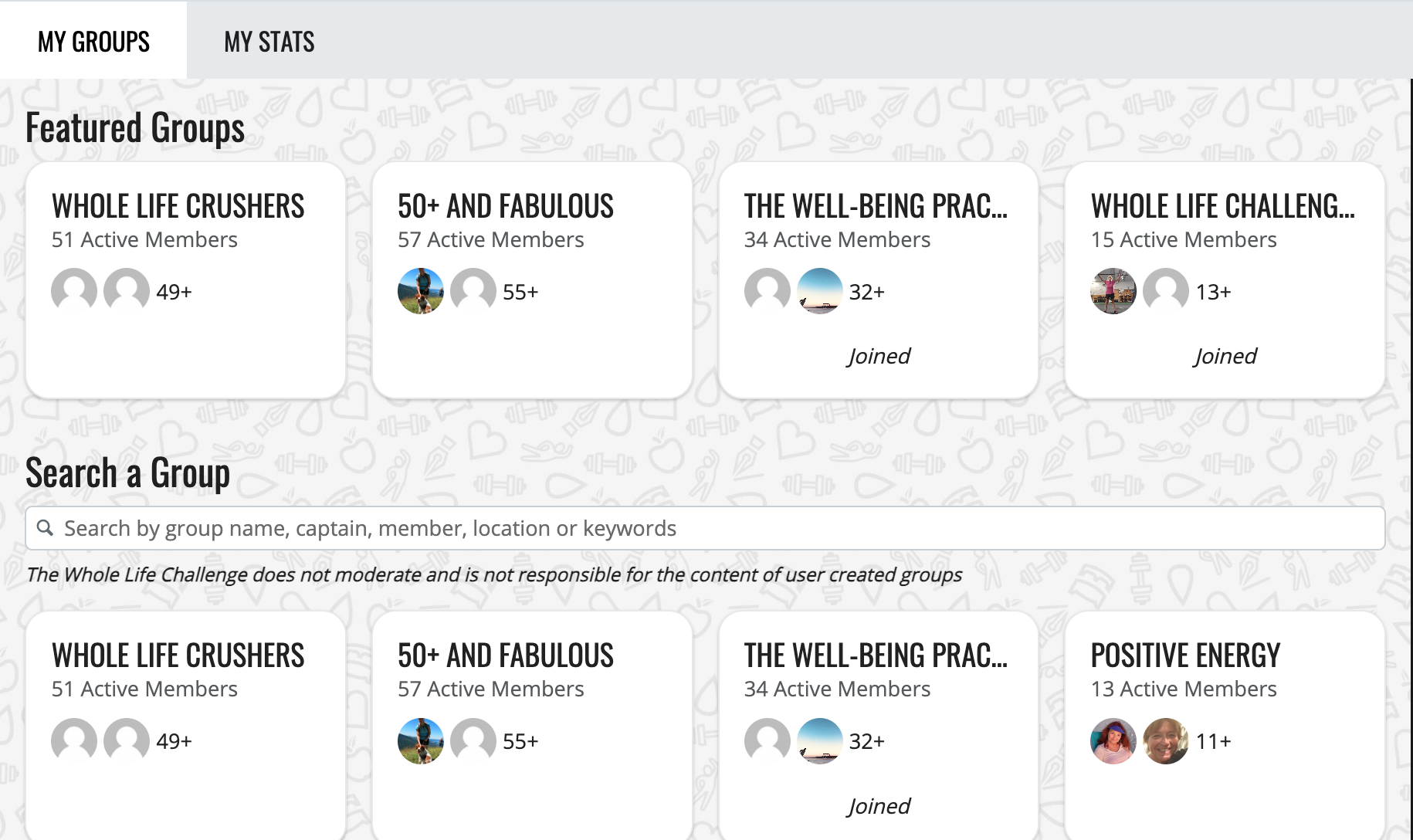
You can read more about Groups here
Choosing Your Nutrition Commitment
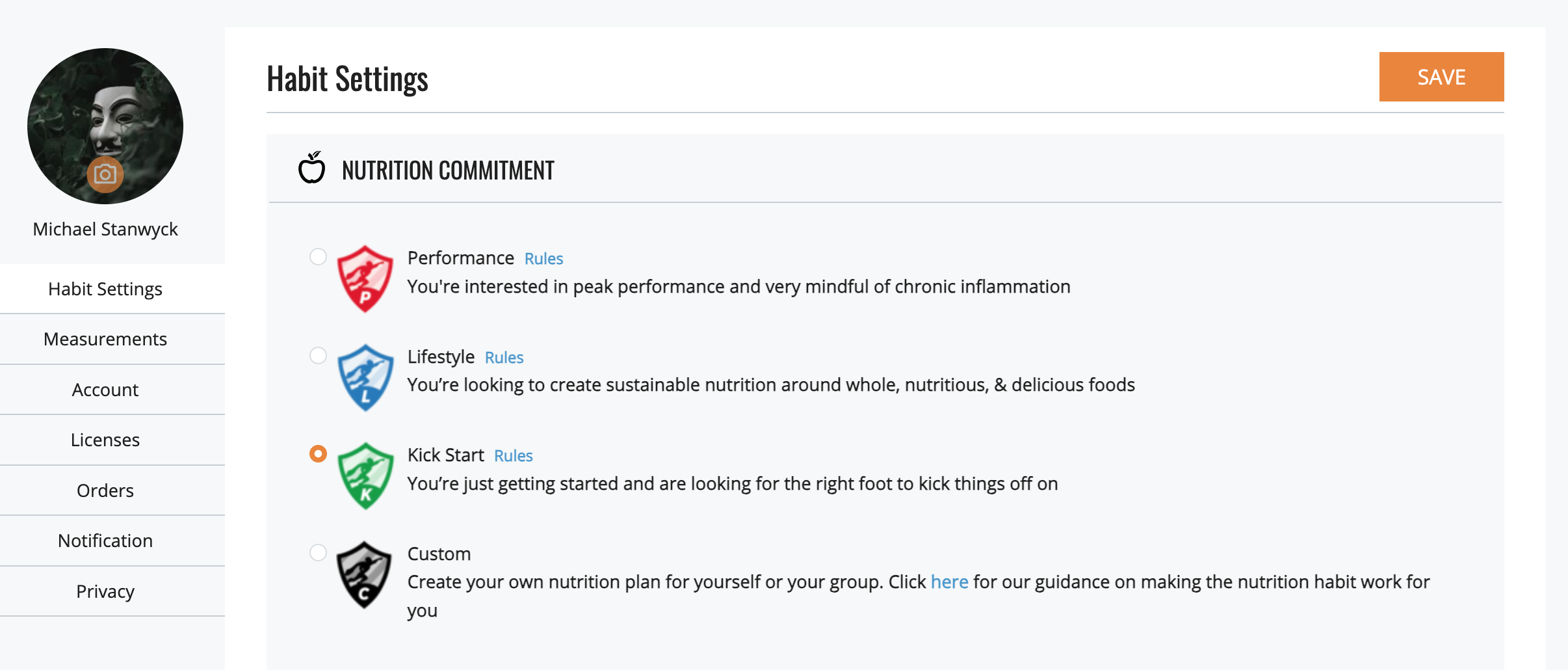
You have a few choices when it comes to the Nutrition rules you'll follow. If you don't know quite how to create a diet for yourself, we offer three predesigned choices you can choose from. If you have a diet you want to be accountable to or just want to design your own, you can select Custom, download our guide, and create a commitment that suits you and your goals.
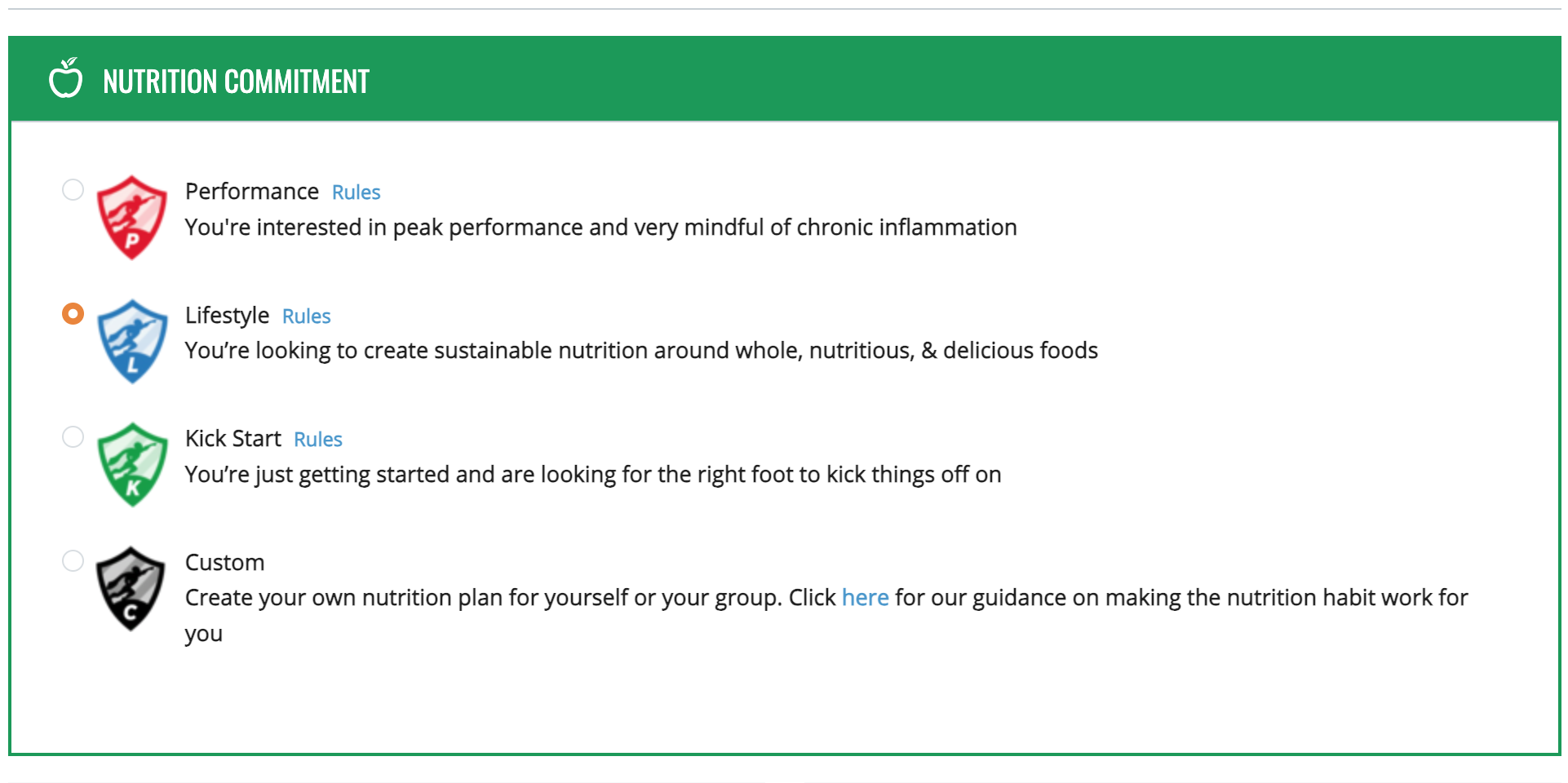
Our three diets look like this
Performance resembles the Paleo diet and removes grains, processed foods, dairy, sugar, alcohol, and artificial ingredients. This is great if you want to fine tune an already working diet, if you're looking to eliminate foods to see if any are problems for you, or if you have chronic health problems or inflammatory conditions.
So what can you eat? Fish, poultry, beef, vegetables, fruit, nuts, seeds, most oils, and sweet potatoes. Think of it as a short-term acceleration program. While elements of it can be adapted to your daily life post-Challenge, maintaining it over the long term could be difficult and may be unnecessary.
Lifestyle aligns most closely with a Mediterranean diet in that it allows some grains, dairy, a little alcohol, and is a little more lenient on added ingredients.
It's a good choice if you are looking for a long-term lifestyle nutrition program. This is a great start to a sustainable practice of living a healthy lifestyle.
Kickstart is a great place to begin if you just need a place to start. Rather than focusing on what you do it, it's more concerned with what you don't eat. Kickstart cuts out most of the "junk" and gives you one or two things each of the five main nutrition categories (Meats, Grains, Dairy, Sugar, Alcohol) to eliminate.
You can eliminate more as you go on, but this gives many people a solid foundation that doesn't stray too far from the diet they may be used to.
How does the Nutrition category work?
You will begin each day with 5 points, and you will lose a point anytime you eat a food that is non-compliant based on your nutrition commitment.
You can change your commitment once the Challenge beings, but we encourage you to level up rather than down once you begin. To see the food lists for all 3 levels, please click here. If you have questions about the "why" of the rules, or just want deeper insight to our approach, please check out our Nutrition Rules Explained e-book. It's free to download.
To set or change your Nutrition commitment, open the menu and choose HABIT SETTINGS. Don't forget to click SAVE after making any changes!
____________________________________
Setting Your Sleep Commitment
You have two choices of Sleep commitment in the Challenge.
1. Hours of sleep
2. Bedtime
Some people find it simpler and more straightforward to pick a bedtime than to try and calculate their sleep each night, but if your bedtime is not consistent between week nights and weekends you may want to choose hours of sleep as your commitment.
Here are the steps to determine your sleep commitment for the Challenge.
1. How much sleep do you get now? This is the place to start. Not what is optimal, but how much do you actually get? I'm sure it varies from day to day... so what's your average?
2. How much could you get, on average, realistically? This is where the rubber meets the road... This number should be a small stretch for you. Something that is achievable, but represents an improvement from what you're doing now.
3. THIS is the number you enter into your profile for your daily sleep prescription. Remember, on days where you achieve it, you'll earn your 5 points...on days that you don't, its a "no" and 0 points. There is no "middle ground".
Examples:
1. You sleep only 5 hours during the week, but 8 hours on the weekend, making your average, 5 hours; 50 minutes. Committing even to 5:50 would be rough, since it would mean, based on your current habits, that 5 out of 7 days, you'd get a "no" for sleep in the Challenge. You decide that an improvement would be to increase the amount of sleep you get during the week to 5:20 or 5:30. Realistic. Achievable. A small stretch. While it's much less than your average, it's a number that would work well for your for the Challenge.
2. You sleep about 6 hours 30 minutes per night, no matter what day of the week it is. You decide that an optimal night's sleep for you, where you feel your best when you wake up, is 7:45. This simply isn't realistic - to jump from 6:30 to 7:45, so you decide to take a baby step... committing to 6 hours 45 minutes for the Challenge. Perfect.
3. On nights where you go to bed before 10:30pm, you get 7 hours 30 minutes of sleep - which, you decide, is optimal for you. On nights where you go to bed later than that (about 4 days per week), you get 6:30. Rather than committing to getting 7:30 of sleep each night during the WLC, you decide to focus on the nights where you're not getting to bed early enough. You believe it would be possible to get to bed 15 minutes earlier on those nights. A stretch, slightly uncomfortable, but you could do it. So, you use 6:45 as your sleep prescription for the WLC.
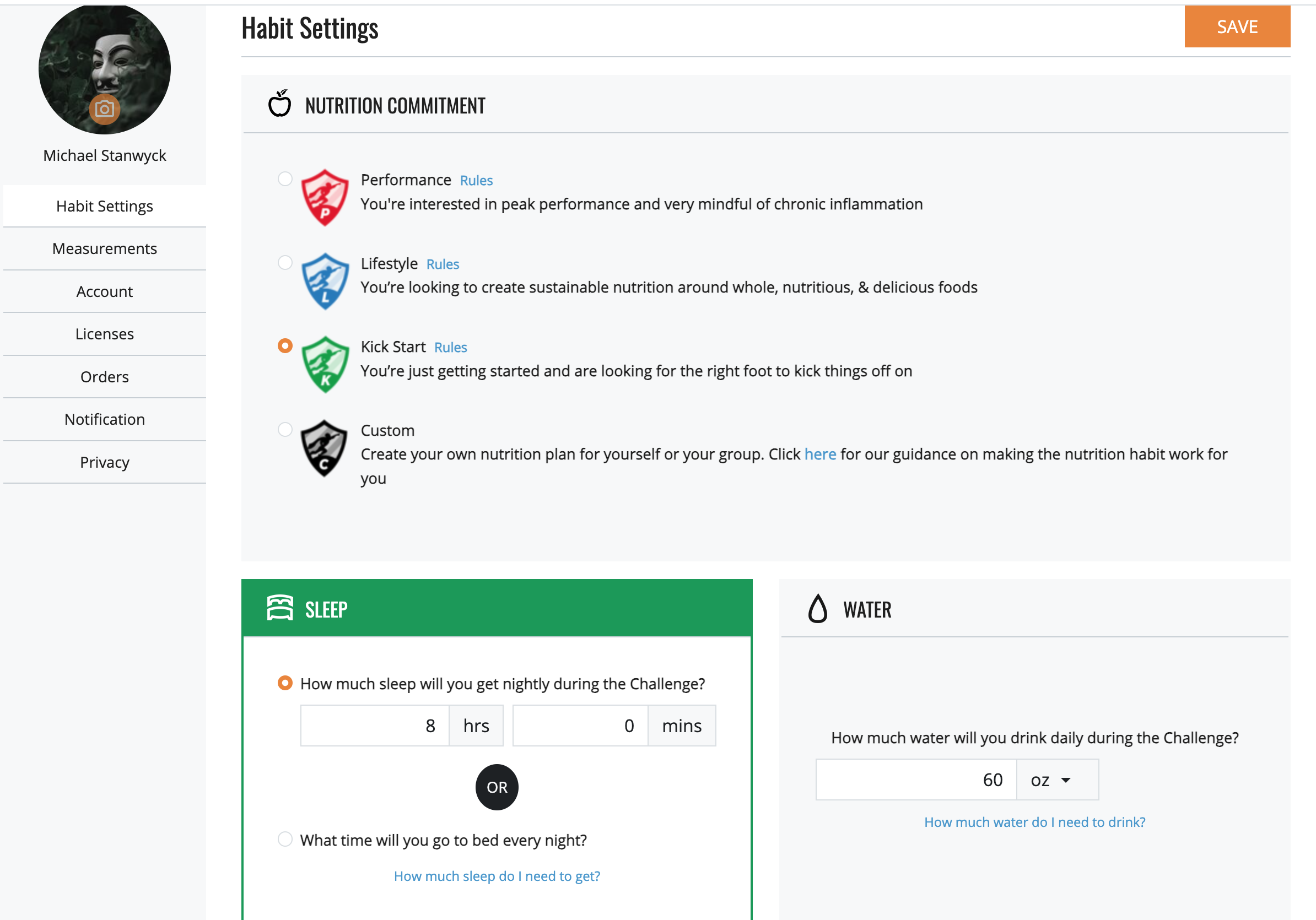
To enter your sleep commitment, open the menu and select HABIT SETTINGS, enter your hours and minutes or select bedtime and enter a time, then click SAVE.
___________________________________
Starting the Challenge - the Self Assessment
The Whole Life Challenge Measurements and Self-Assessment is quick and easy, with just a couple parts to it. And, you can get an indulgence token for completing it!
The Whole Life Challenge begins and ends with the Whole Life Challenge Self-Assessment.
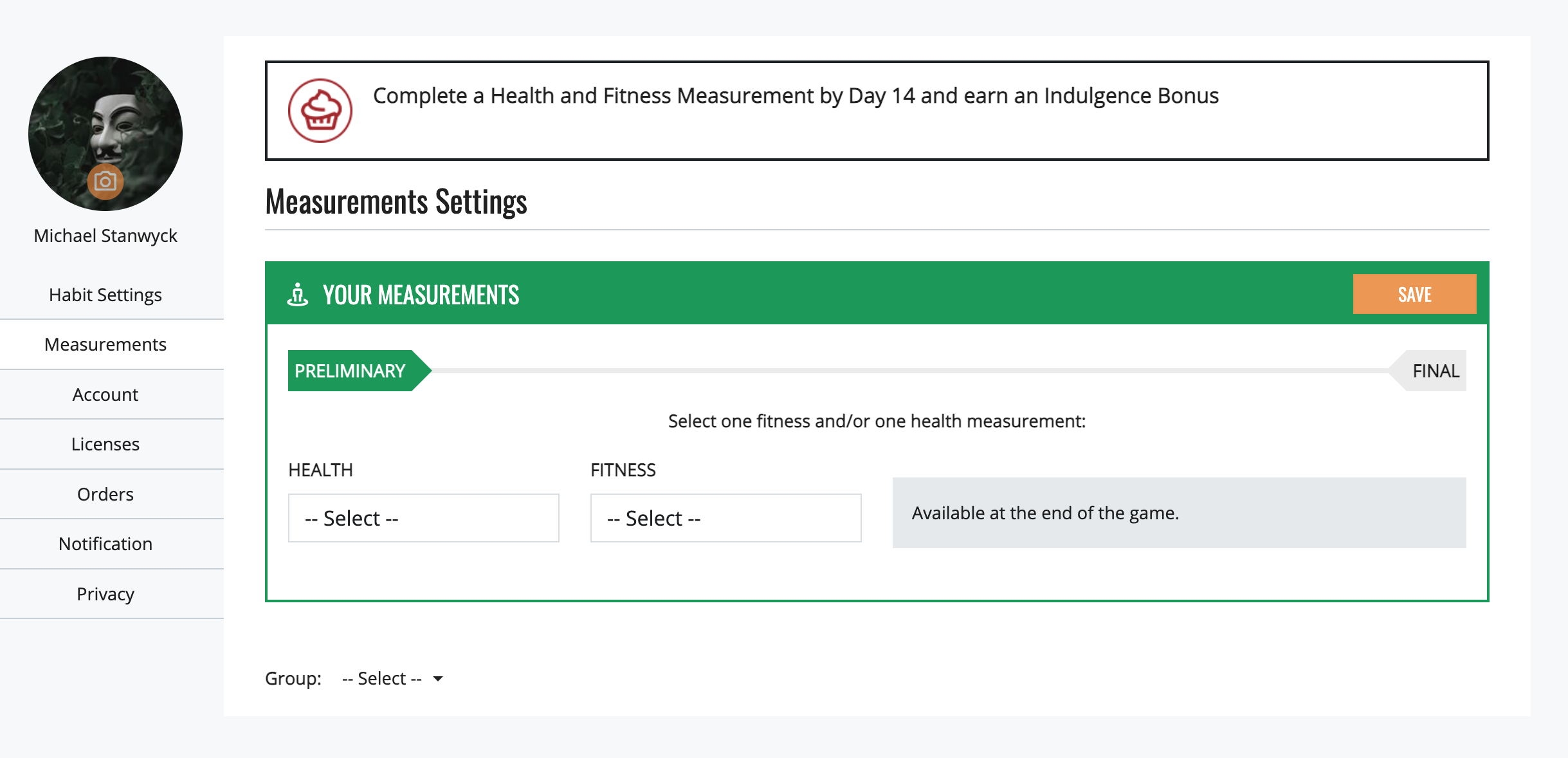
To access the self assessment, click on MEASUREMENTS in the menu. Fill in the health and fitness measurements fields, then click SAVE when you're done.
You will need to enter both a health measurement (weight, hips and waist measurement, or body fat %) and a fitness measurement in order to complete the Baseline Assessment and earn your bonus.
The section that is initially visible are your personal measurements. If you are a member of a group that has official measurements, you can access them by selecting your group from the drop down menu at the bottom.
We provide a few basic fitness measurements, but you are welcome to create your own as well.
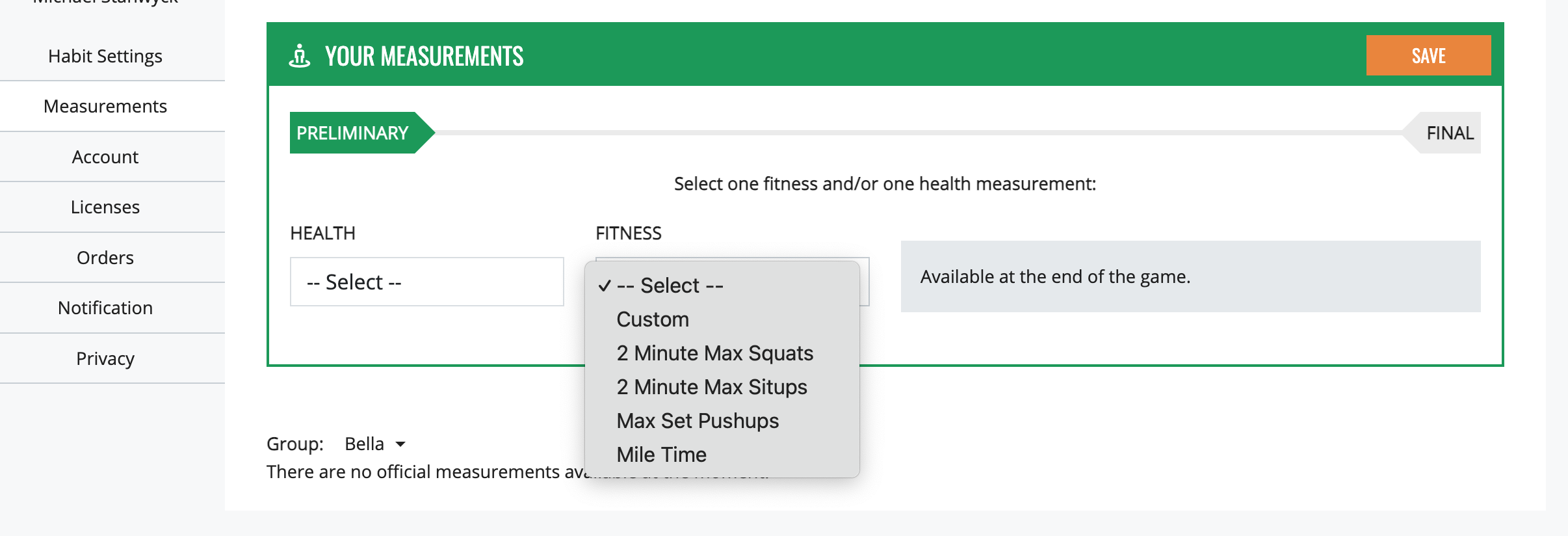
If you are creating your own custom workout, please be careful in choosing the type of workout: time or score. Enter your result in the second box and a description of your workout in the third.
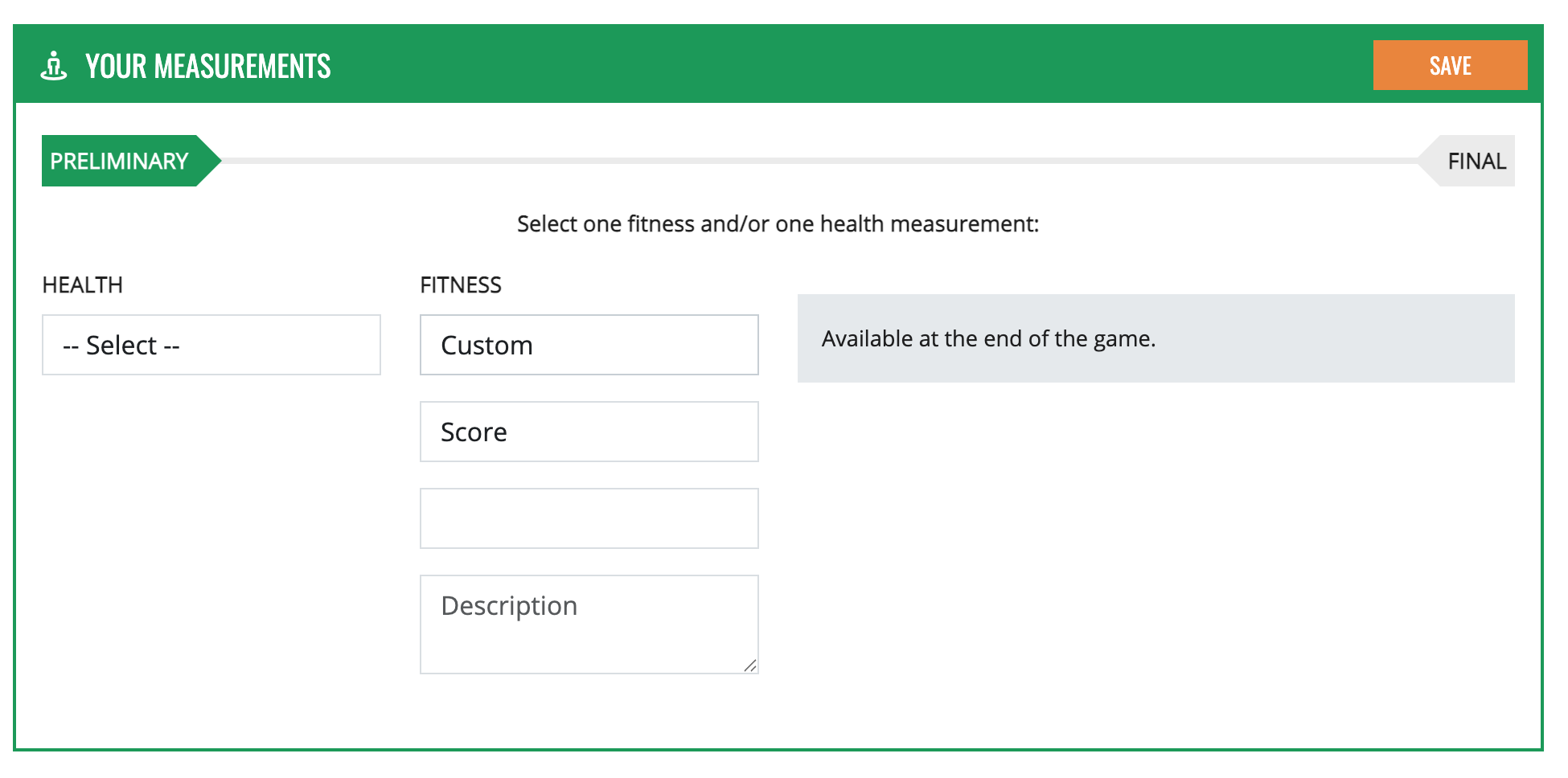
For your fitness measurement - perform a measurable workout (with clearance from your doctor, if necessary.)
For a workout to be measurable, it must be a physical activity that can be timed or scored with a single number.
A 5k run is a good example of a timed workout, but it can also be a set workout that you try to complete as fast as you can. You start when the gun goes off, give it an all-out effort, and get a time when you cross the finish line. Your time is the measurement.
A weightlifting max or a CrossFit AMRAP can be a good example of a scored workout.
Just keep in mind that a timed workout will register an improvement if the time decreases between the baseline and the final and a scored workout will register an improvement if the score increases, so selecting the correct on is important.
You will repeat your measurements when you complete the Challenge. We will provide you with final stats that show you how you did across the 7 Daily Habits as well as your health and fitness measurement improvements.
If you are a member of a group that has official measurements, your improvement in your workout score and measurements will be part of the formula used to determine your final ranking among your teammates. If you do not complete the preliminary and final measurements, you will not appear as ranked on the finals board.
Your measurement data will be private from your teammates. They will only see percentage changes if you appear on the finals board.
Your measurement data will not necessarily be private from the administrator of your group. They can opt out of having your data accessible to them, but by default it is visible.
____________________________________________
Which Parts of My Profile Are Public?
As noted in the previous section, your measurements are private from the challenge body at large unless you are a member of a group with official measurements and you fill out official measurements.
Any personal measurements you create are private to you.
The other part of your profile you can make private are your reflections. By default they are posted to your group's feed and are visible to the members of your group.
You have the option of setting your reflections to private both when you are writing your reflection and in your Privacy settings.
The first time you write a reflection you will be prompted to set them to private if you wish. Once you choose your setting, it is permanent unless you change it in the Privacy settings. You do not need to select it each day.
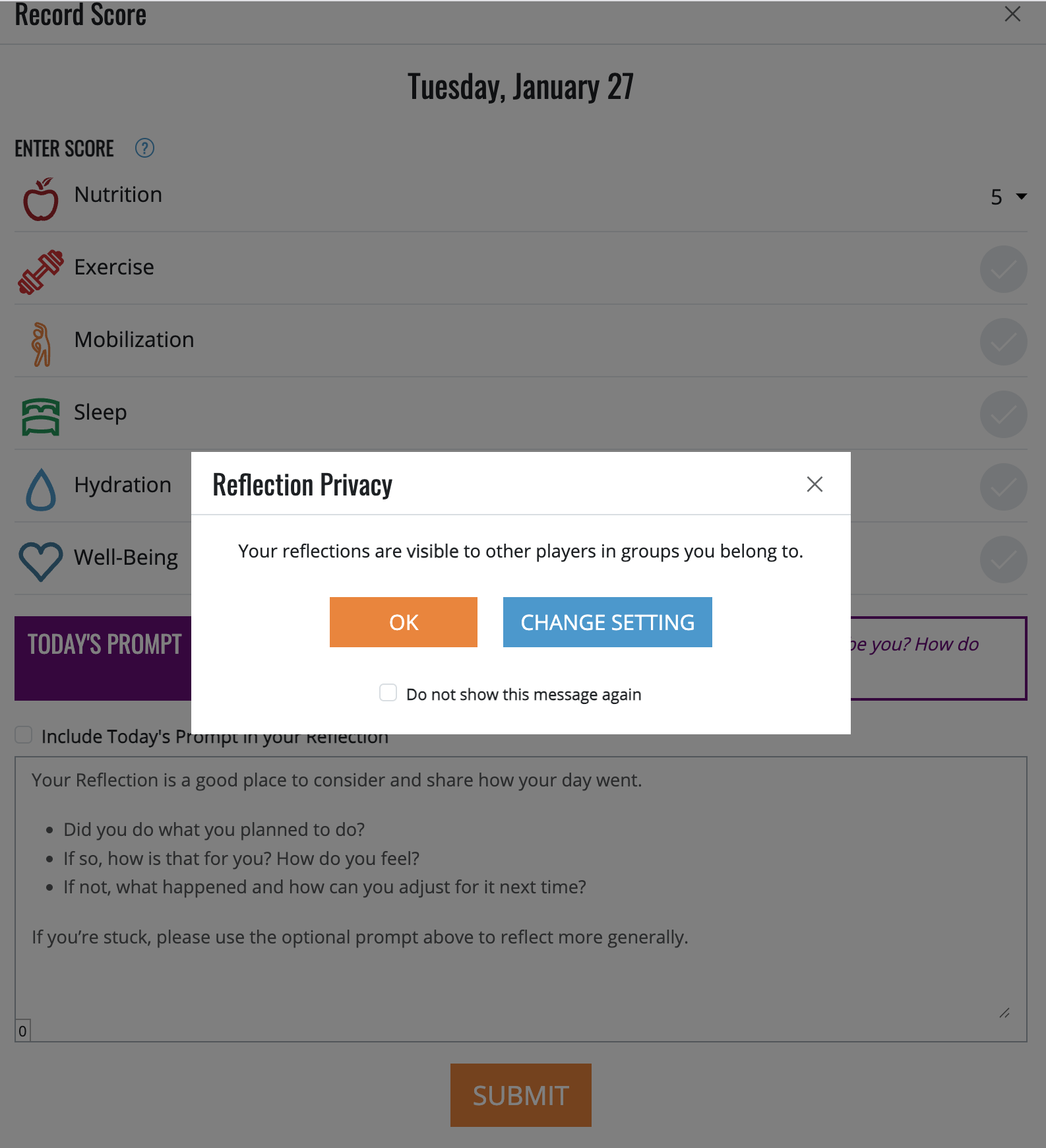
We encourage people to write public reflections as it gives you teammates the opportunity to support you, but some people find that they use the reflection habit more effectively if they can write deeper and more personal reflections that they do not wish to share.
Not every group allows reflections to be posted publicly, so if yours are not private and are not appearing, the admin may have that setting activated.
If you want to change your setting once you've made your initial selection, visit your account page and change it under Privacy.
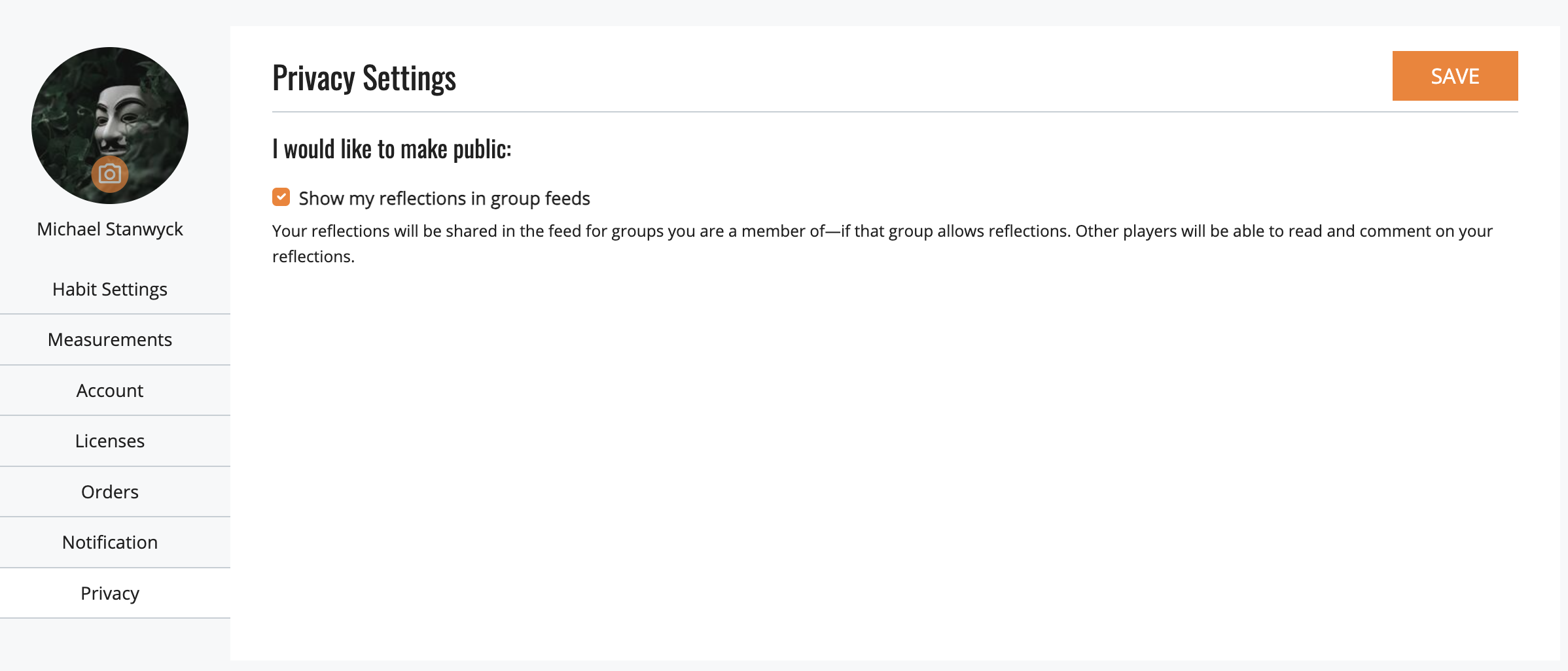
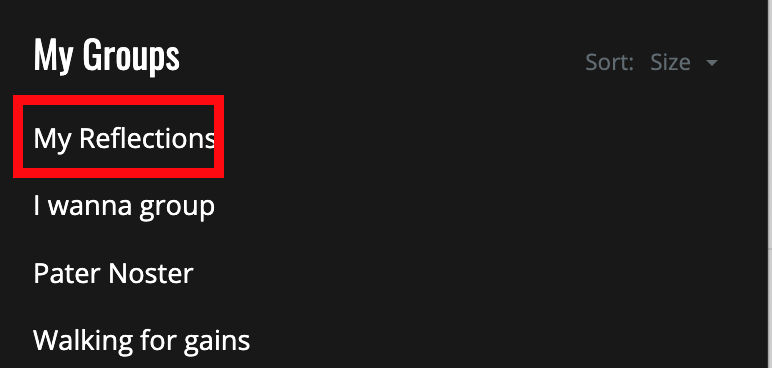
Regardless of whether your reflections are private or public, you will always have a running feed of them under the My Reflections heading in the Group selection menu
________________________________
Daily Play and Scoring
The Challenge officially begins at bedtime on Friday night when you go to sleep. Your sleep score refers to the night before, so your Day 1 sleep score is based on your Friday night to Saturday sleep.
Starting then, and continuing through day 42, you'll be adopting the WLC's 7 Daily Habits and scoring yourself based on your actions. You can start scoring your day as soon as you like, checking off habits and returning throughout the day to update your score.
The seven daily habits are:
- Nutrition—worth 0 to 5 points each day
- Exercise—worth 5 points each day
- Mobilize—worth 5 points each day
- Hydrate—worth 5 points each day
- Sleep—worth 5 points and based on the previous night (e.g. Tuesday's sleep score is based on the Monday night's sleep)
- Well-Being Practices—worth 5 points each day
- Reflection—worth 5 points each day
You will only receive points for your reflection if you post it here, at the bottom of your daily record. Posting a status update in your group's feed will not count as your daily reflection and will not earn the 5 points.
If you don't know what to write about, we offer a daily prompt to start your juices flowing. You can use it if you choose or ignore it completely. Because the prompt is in the form of a question, we suggest you select the "include today's prompt" so readers know what question you are answering.
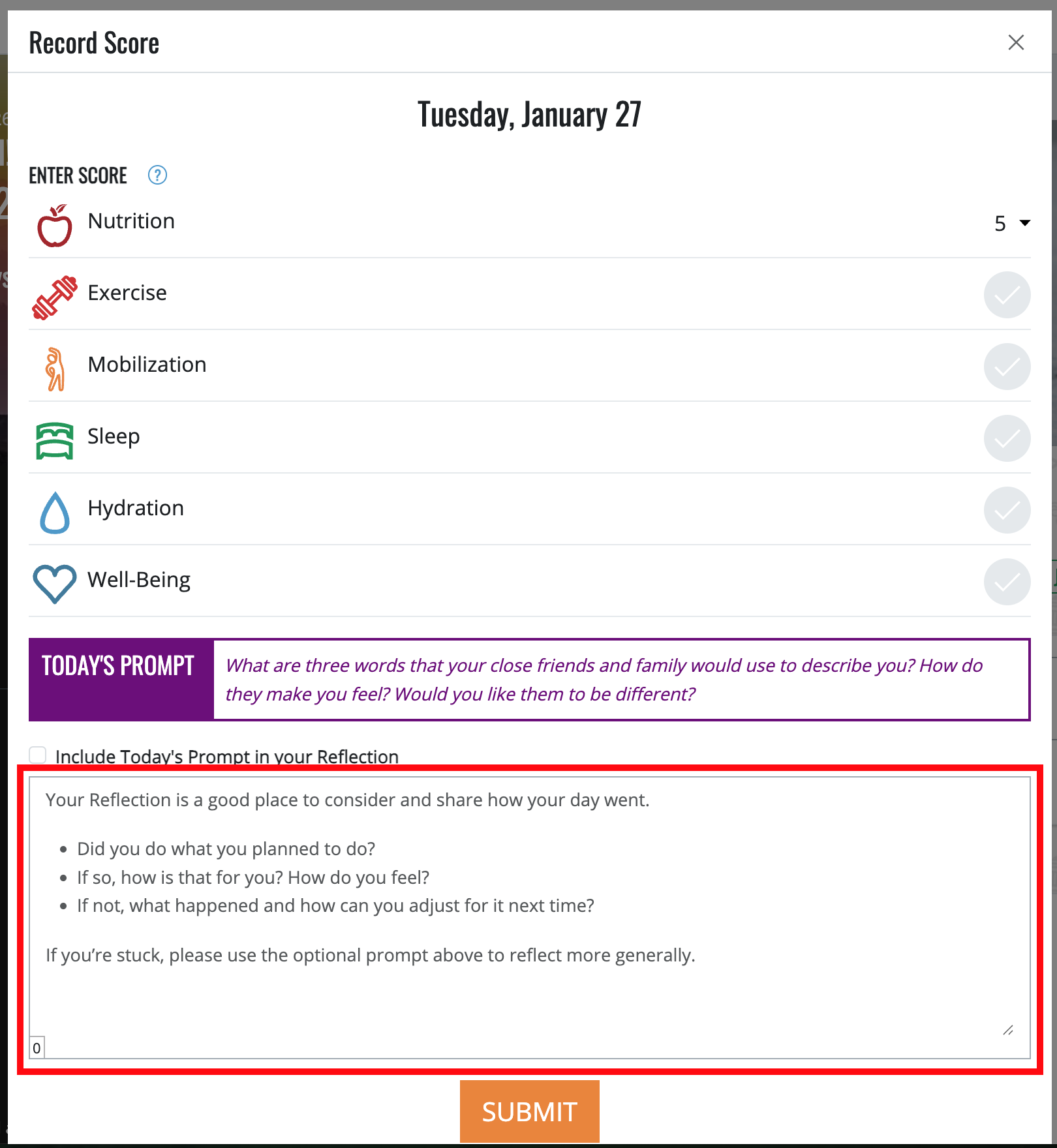
You can earn a maximum of 35 points each day.
Scoring for Day 1 includes your sleep score from Friday night's sleep and Saturday's adherence to the other six habits.
The rules for each category are:
Nutrition (0-5 points)
You begin each day with all 5 possible nutrition points. You will subtract a point for each serving of a food that is non-compliant (based on your chosen nutrition commitment).
When you record your score, enter the number of points you have remaining out of 5 at the end of the day.
Click HERE to for a comparison of the levels as well as a complete list of what is allowed and prohibited in each of the 3 Nutrition Levels of the Whole Life Challenge. Generally: If you don’t know whether something is allowed, don’t eat it.
REMINDER: Losing points for food choices during the Challenge is normal and expected. Making choices is part of life. Don’t choose perfection over your happiness or quality of life. If you’re at your best friend’s wedding, drink the wine and eat the cake! Losing the points is worth it. As far as we’re concerned, learning how to make choices that result in long-term health, happiness, and well-being is much more important than earning a perfect score.
Exercise (0 or 5 points)
The Whole Life Challenge emphasizes daily activity. To earn credit for the exercise habit, you must accrue at least 10 minutes of activity each day. We recommend 3-5 "workouts" each week with 2-4 days of more restful activities like hiking, walking, pick-up games, or even riding your bike or walking to work or on errands.
How does the Whole Life Challenge define “exercise?” We let you decide. If walking around the block is exercise to you (and it takes you at least 10 minutes), then you have met this daily requirement. Generally speaking, if your heart-rate is elevated and you are doing something to build or increase your strength, endurance, stamina, flexibility, speed, power, balance, coordination, agility, or accuracy, then we’d call it exercise.
For those of you who like to train hard, remember that active recovery counts too, so go out and have fun, play Frisbee, kick a soccer ball, take a walk, ride a bike. Sometimes, “playing” is as important as going hard for your overall well-being.
Mobilize (0 or 5 points)
The requirement for earning 5 points for this habit is 10 minutes of accumulated mobilizing time. It can be done all at once or broken into chunks over the course of your day.
What is mobilizing? Mobilizing means taking an action that increases your range of motion in a muscle or joint. This includes any sort of stretching, yoga, foam rolling, dynamic stretching (movement), using a mobility tool (lacrosse ball, vibration device, e-stim device, etc).
What doesn't count? Anything that requires the work to be done by someone else - getting a massage, going to physical therapy, etc. If you need some ideas, check out our the Mobility and Stretching section of the Whole Life Challenge blog.
Hydrate (0 or 5 points)
Calculate 1/3 of your bodyweight in pounds and drink this number each day in ounces of water (22 mL per kg of bodyweight) to earn 5 points for this daily habit. Water, coconut water, and herbal tea count towards your daily requirement. Coffee, other caffeinated beverages, and alcohol do not.
Sleep (0 or 5 points)
At the beginning of the Challenge, determine for yourself an amount of sleep that you will get or the bedtime you will keep in order to earn your 5 daily sleep points.
There is no fixed calculation for sleep hours (we generally recommend at least 7 hours per night, but that might not be possible for you).
Choose the number of hours/minutes that is close to what you're averaging now, and represents an amount that you would be happy about achieving each day. Think "small stretch", and remember that a small, incremental improvement each day, multiplied out over months and years will lead to huge benefits. The number should be both believable and achievable.
Well-Being Practices (0 or 5 points)
Each week, we will introduce a new Well-Being practice. You will earn 5 points for incorporating this practice or your own personal version of a daily well-being practice into your daily life.
We provide a new practice each Friday only as a suggestion. If you have a practice like meditation, prayer, or journaling you want to be accountable to for the entire Challenge, you are welcome to use that. You can also keep any of our suggestions all challenge long.
These habits will range from physical activities like taking a walk alone or decluttering your space to practices with more intangible benefits like meditation or increasing mindfulness.
Each new practice begins on Saturday and will be announced in advance in your groups feed if allowed by your group's admin, in your notifications, on your dashboard, and by email.
Reflect (0 or 5 points)
When posting your daily score, you will have an opportunity to earn 5 points by posting a “Reflection,” or a short recap of how the Challenge is going for you, what you've noticed, what you're learned, or what you are going to change.
Think of your reflections as a public journal. It will be visible to teammates and other players in the Challenge, and other players worldwide will be able to comment on your reflection with support, motivation, or suggestions.
You may change the visibility of your reflections in the PRIVACY menu selection.
**IMPORTANT NOTE**
Though not part of the official rules, it’s important to note that reading your teammates’ Reflections in the feed—and then offering them encouragement and support—is a big part of the Whole Life Challenge. This is where players can check in to see how other people on the team are doing. This is the heart and soul of the game. It’s where people from both official and unofficial teams can engage, support, empathize, and interact.
Start entering your daily score as soon as the day begins. When you wake up in the morning, open the app, click RECORD TODAY'S SCORE, and check off your Sleep Habit if you hit your target.
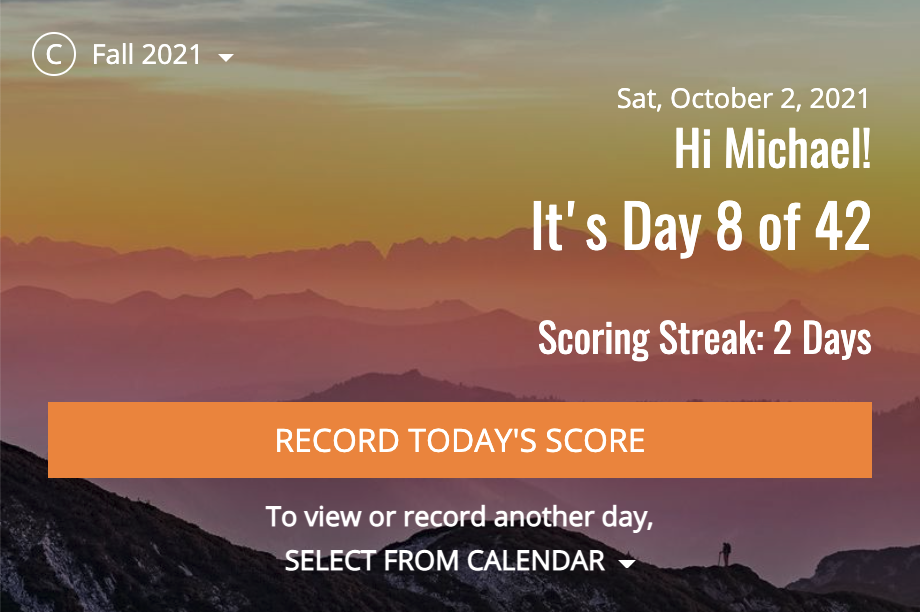
Save your score and return to it as often as you like throughout the day, as you complete the Habits. Simply select VIEW OR UPDATE TODAY'S SCORE and continue to mark them off.

You can complete your score at any time. Your daily records can be entered, edited, or updated at any point using the calendar link below the RECORD TODAY'S SCORE button.
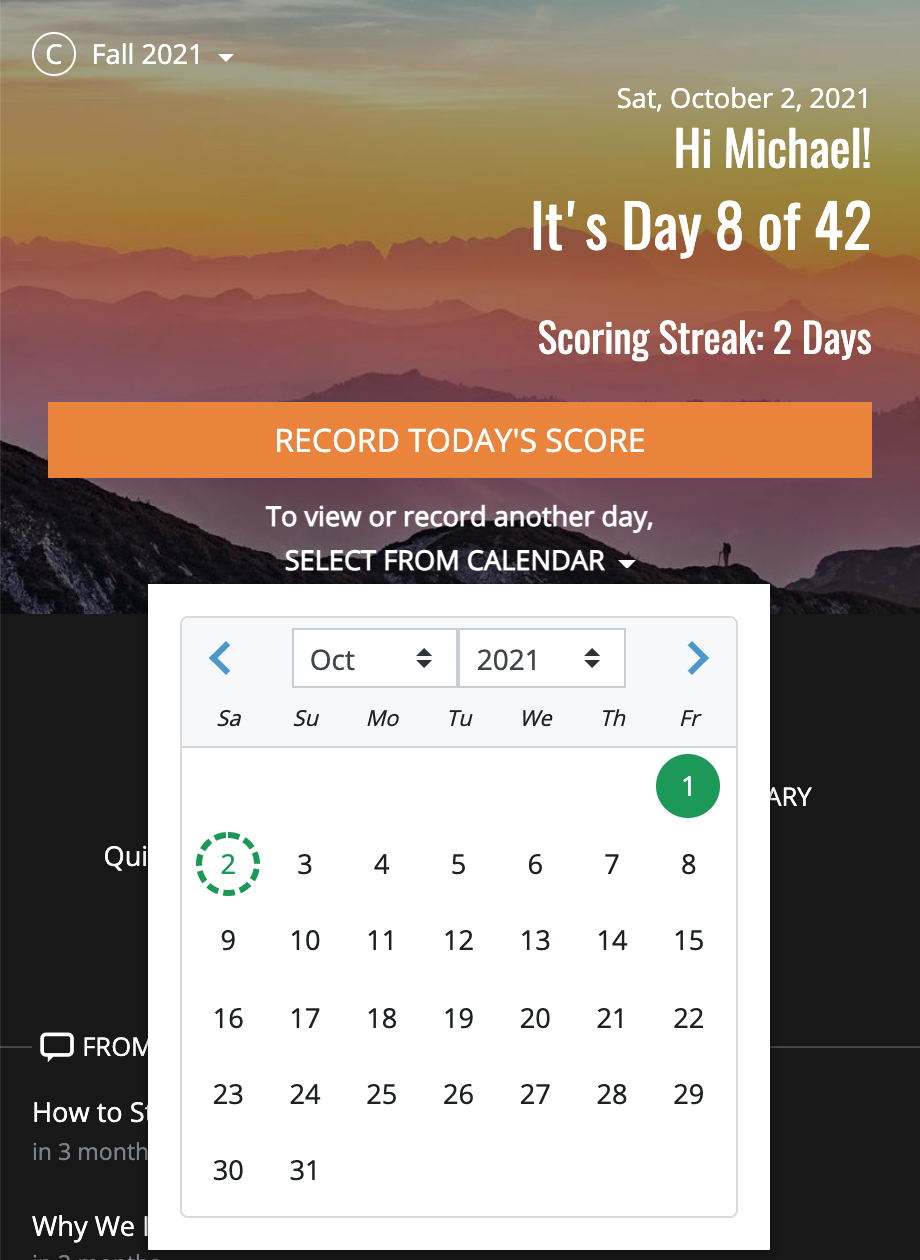
This means that if you're off-line for any period of time, you won't lose any of the points you earn, as long as you're keeping track. You can enter them all as soon as you return.
But, don't forget that you will also be awarded a STREAK for logging in and recording on the website each day. Your streak count is visible above the scoring buttons. If you miss a day, your streak count resets to 0 days.
You must enter at least one element of your score on the given day in order to maintain your streak.
The streak is not a streak of scores entered. It is a streak of entering the score on the day it is due.
You can finishing recording your score at any time. As long as the record is created on the same day, you will keep the streak.
We recommend that you complete your score by the morning after the day you are recording for. Reflecting for several days in the past can be very difficult!
And don't forget-- you can record your reflection at any time during the day. There is no need to wait until the end of your day if the perfect reflection for the day occurs to you mid-afternoon. You can enter that at any time, just like any other part of your score
Since consistent scoring is such an integral part of the game, be sure to check that your score was saved after entering it. You can see your scoreboard in the "MY STATS" tab.
For Nutrition, you will be asked to enter a number between 0 and 5. Enter the number of nutrition points you kept that day.
Remember, you begin each day with 5 and lose a point for each serving of food that is non-compliant at your level.
Indicate “yes” or “no” for the next five habits—exercise, mobilize, hydrate, sleep, and Well-Being Practice —to indicate whether you incorporated each habit into your day. Finally, write and save a reflection. For all six of these habits, you will earn 5 points for a "yes", or 0 points for a "no". There is nothing in between.
Bonus Points
Rest-Day Bonus
During the Challenge
During the Challenge, you'll want to do things like check your progress, make status updates, post pictures, read and comment on teammate's reflections, and check the leaderboard.
Finishing the Challenge
The last day you will enter a daily score for is Friday, Day 42 (you will be able to enter this score through midnight on Saturday).
The Whole Life Challenge isn’t officially complete, however, until you have taken your final Whole Life Challenge Body & Fitness Measurements, which are designed to be done on the Saturday after the Challenge ends.
If you are a member of an official team, your team leader will likely plan a finals event and enter your workout time/score and body measurements during this event.
If you are not a member of an official team, or if your team leader hasn’t planned a finals event, we recommend that you take your Whole Life Challenge Body & Fitness Measurements on Saturday morning.
There are no penalties for taking your Whole Life Challenge Before and After Measurements early, and you have two weeks after the Challenge ends to enter your "After" Measurement numbers. That said, the Saturday after Day 42 is where all of your efforts will culminate. This is the optimal target day for your final Before and After Measurements. Make every effort you can to do it on that day.
If you are not playing with a team, you will receive a Final Stats page that details your overall performance during the game
- Days scored
- Average daily score
- Weekly averages in each of the 7 Daily Habits
- A comparison of any fitness and body measurements you entered
- A side-by-side comparison of your Quality of Life questions, Before and After photos, and stated Goals and Outcomes.
If you are playing on any team, you will get a Team Stats page that will show you a little bit about how each of your team members did - attendance percentage and average daily scores
If you are playing with an Official team and your team captain has created official fitness and body measurements for your team, your team members' details will also include their improvement percentages in their fitness and body measurements and you will be ranked among your teammates in three categories (as long as you have completed your Preliminary and Final Self-Assessments):
1. Total Daily Points—This will account for 50% of your final ranking.
2. Workout Improvement—This will be determined by your percentage improve ment in the time or score of your WLC Workout. This will account for 25% of your final ranking.
3. Body Measurement Improvement—This will be determined by your percentage improvement over the initial measurements. This will account for 25% of your final ranking.
You must enter your final daily score and both Before and After Workout and Body Measurements to appear on the Finals Board.
The player on your team who is ranked highest is the player with the lowest combined rank score based on the combination of these three rankings. In the event of a tie, the player with the higher average daily score will be ranked higher.
Whole Life Challenge HQ does not declare an overall winner of the worldwide Challenge. In fact, there is no overall winner. You will be able to see results from other groups around the world, but none of these results will have any bearing on the winner of your group.
Final ranking in Daily Points will not be negatively affected by the use of bonus points.
Awards and Prizes
Official teams may or may not offer prizes. It is up to the team leader to decide if and how these prizes will be awarded.
Was this article helpful?
That’s Great!
Thank you for your feedback
Sorry! We couldn't be helpful
Thank you for your feedback
Feedback sent
We appreciate your effort and will try to fix the article